Yiwu Market District 6 Guide
Global Digital Trade Center: north and south areas, product checks and a practical buying route.
What can you buy in District 6?
Yiwu Market District 6, also called the Global Digital Trade Center, brings together fashion jewelry, trendy toys, fabrics, skincare, baby products, home and health products, smart equipment and travel essentials. Choose both an area and a floor before arranging supplier visits.
The center opened on October 14, 2025, east of District 5. For a buyer, its name does not replace the usual sourcing work: inspect the exact product, establish who supplies it and save a written specification and quotation. A new showroom or impressive demonstration is a starting point for questions, not a complete order brief.
District 6 area and floor directory
The area layout below follows government-published market information. Use it for orientation and confirm the current block, entrance and booth with each supplier.
| Floor | North area | South area |
|---|---|---|
| 1F | Fashion jewelry and fashion fabrics | Creative and trendy toys |
| 2F | Skincare and medical-beauty products | Baby and children’s everyday products |
| 3F | Home living and health or medical products; drones, robotics, AI and AR/VR equipment | Travel essentials |
What to check in each product area
New designs and smart products can have several configurations under one product name. Record the model, version, accessories and intended sales market before comparing offers. For custom goods, distinguish what is already available from what still needs a sample or development work.
Fashion jewelry: compare construction as well as design
Record dimensions, stated base material, finish, stone or decorative details and fastening. Inspect the back, joints and moving parts as well as the front of the display. Ask whether all colors use the same construction and whether a presentation box or pouch is included.
For an original or branded design, clarify which version the supplier can provide and what customization is available. Ask for information about the design and sales arrangements relevant to your intended use. Keep a custom finish or engraving separate from the ready-stock price, and confirm how repeat orders will match the approved sample.
Fashion fabrics: make the specification and sale unit explicit
Record stated composition, usable width, fabric weight where specified, weave or knit, finish and color. Ask whether the quote is per meter, yard, kilogram or another unit and how much material is supplied per roll. Compare a swatch with the exact quoted specification rather than relying only on the display name.
For printed or patterned fabric, note the repeat and direction. Ask how production color will be approved, whether minimums apply by color or batch and how short rolls or defects are recorded. If the supplier changes the material or finish, record a new option instead of silently replacing your original brief.
Creative toys and collectibles: define the series and pack contents
Record dimensions, material, components and the exact design or series. Open an example sale pack and list what it contains. If the offer uses a mixed assortment, ask how that assortment is defined; a display of several designs does not mean that you can choose any ratio in the order.
Distinguish display collectibles from products intended for children and tell the supplier your buyer’s intended use. Request the product details and documentation needed for that exact version. For character or branded merchandise, ask what information the supplier can provide about the design and proposed sales channels. Confirm whether the pack, branding and accessories in the sample belong to the quotation.
Skincare and beauty products: identify the exact sale unit
Record product name, variant, stated fill volume, ingredients information, packaging and supplier item reference. Ask for a sealed sale-unit sample alongside any tester. Save batch identification, shelf-life details and storage information where applicable.
Tell the supplier where the goods will be sold and ask which documents and labeling details it can provide for the exact product. For a beauty device, record the model, intended function, accessories and electrical configuration. Keep demonstrated features and supplier claims separate from what you have verified. If formula, device model or packaging changes, reopen the specification discussion.
Baby and children’s products: start with intended use and dimensions
Record intended age or size range, materials, dimensions, construction and included accessories. Inspect fastenings, attachments and how the item is assembled or adjusted. Ask whether the display includes optional parts and whether they belong to the quoted version.
Use your buyer’s requirements to define the sample and documentation needed before ordering. A category label or appealing display is not enough to approve a product. For a range with several sizes, colors or functions, write out the quantity split and request a quote for that actual assortment.
Home and health products: distinguish a function from a claim
Record the product’s intended application, dimensions, materials and model. For an electrical item, note its relevant ratings, plug, controls and included parts. Ask the supplier to describe which version will be delivered and what instructions and documentation it supplies.
Some goods in a health-related category may be ordinary household items while others are presented for a specific professional use. Establish the intended use and exact specification with your buyer. Request support for important product claims rather than turning a showroom description into your own sales claim. Save unresolved documentation questions alongside the quote.
Smart equipment: quote hardware, software and support together
For a drone, robot or AR/VR product, record the precise model and configuration. List controllers, batteries, chargers, sensors and other accessories included in the price. Ask whether the demonstration unit uses the same hardware as the unit offered for sale.
Discuss app or software requirements, supported languages, accounts, connectivity and any ongoing fees. Ask what functions work without a network and what setup is required for your intended market. Agree a supplier-led demonstration around the functions you need, then record what was shown and what still needs confirmation.
Ask who handles updates, replacement parts and faulty units. Clarify whether technical support is provided by the booth, manufacturer or another business. A compelling demo and a low hardware price can conceal different software or service arrangements, so keep them visible in the quotation.
Travel essentials: compare the packed and assembled versions
Record dimensions in use and when packed, material, weight where relevant and the parts included. For a folding or assembled item, ask the supplier to demonstrate opening, fastening and repacking. Identify the version you want rather than describing it only as “the camping set” or “the travel accessory.”
For a set, list every component and distinguish standard parts from upgrades. Ask for packing dimensions and how several units are arranged in a carton. If a performance feature matters to your buyer, request the relevant specification and agree how it will be checked before approval.
Choose a route by area, then floor
Group meetings on the same side of the market when practical. These are suggested buying sequences, not measured walking routes. Confirm each supplier’s full address before adding a stop.
| Your priority | Start with | Next step |
|---|---|---|
| Jewelry or fabrics | North 1F: compare defined samples | Confirm design variants, materials, units and repeat-order references. |
| Toys and children’s goods | South 1F and 2F, according to your list | Separate intended uses, pack contents and documentation requests. |
| Beauty, home or smart products | Relevant north-area supplier on 2F or 3F | Arrange model-specific demos and clarify configuration and support. |
| Travel goods | South 3F: inspect packed and assembled samples | Confirm components, packing volume and approval steps. |
Use a first pass to shortlist products and a second pass to resolve missing details. If an item needs a technical demonstration, arrange it with the supplier instead of assuming that a brief walk-in visit will answer every question.
For a broader selection, compare related categories in District 1 for toys and jewelry, District 3 for cosmetics and garment accessories, or District 5 for fabrics and home textiles. Use the district overview to organize the whole trip.
Before you compare suppliers
Fix the version
Record model, material, function and included parts.
Price the whole offer
Include packaging, software and support where relevant.
Approve a reference
Keep samples, demonstrations and open questions together.
Bring one buying brief to every shortlisted booth
For example: “Travel organizer set with the same dimensions, fabric, zipper and three components as this reference sample, individual retail pack and no logo. Please quote 500 sets split between two colors and state the minimum per color.” This is an illustrative enquiry, not a market minimum or a recommended specification.
For a smart product, add model, accessory list, software requirements and requested demo functions. Keep optional hardware or paid services as separate lines so that a quoted price is not mistaken for a complete configuration.
Questions you can use at the booth
- “Which model, version and accessories does this quotation cover?”
- “Is the displayed sample the same configuration as the delivered unit?”
- “What minimum applies to each design, variant or color?”
- “Which packing, instructions and documents are included?”
- “Does it require an app, account, network or ongoing payment?”
- “What sample or demonstration should we approve before ordering?”
- “Who handles updates, replacement parts and faulty goods?”
- “Is the item in stock, and when does the production lead time start?”
A quote record for District 6 products
Keep a separate row for each configuration. Mark missing information as “not confirmed” and assign the next action.
| Record | Include | Why it matters |
|---|---|---|
| Identity | Photos, article number, model, version and sample reference | Identifies the exact product being quoted. |
| Configuration | Dimensions, material, functions and included accessories | Exposes differences behind a shared product name. |
| Price basis | Currency, unit, quantity, variant minimums and delivery basis | Makes prices comparable. |
| Software and support | Requirements, fees, updates, languages and responsible business | Shows the arrangements beyond the hardware price. |
| Packing and approval | Retail pack, carton details, sample or demo results and documents requested | Links the offer to a reviewable reference. |
| Location and timing | Area, block, entrance, floor, booth, contact and lead-time trigger | Makes follow-up and a return visit possible. |
Use the quote comparison guide to bring offers onto the same basis. Compare the complete configuration and terms, not just the amount beside a display.
After the visit: confirm the delivered configuration
Send the supplier a recap with photos, model references, quantities, approved sample or demo requirements and open questions. Ask for written confirmation. Keep revisions to hardware, material, software or packing linked to the final quotation.
If several suppliers deliver to one receiving point, agree how cartons identify the item and version. Confirm who receives and checks the goods. Separate items awaiting samples, documentation or technical confirmation from items ready for order.
Find District 6 on the map
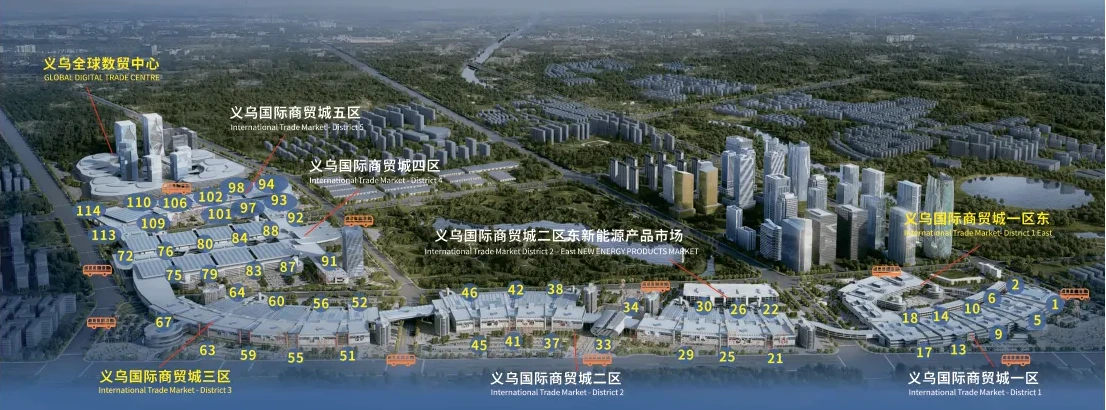
Use the interactive map to locate the district. The PDF is a general market brochure; its overview imagery and floor diagrams should not be treated as a current north/south booth plan. Use the directory above and confirm the supplier’s meeting location.
District 6 questions
Is District 6 the Global Digital Trade Center?
Yes. This guide uses both names for the market. When arranging a visit, also specify the area, block, floor and booth so the supplier can identify the meeting point.
Why do I need both the area and the floor?
The same floor number covers different categories on the north and south sides. A floor alone is not enough to plan a supplier meeting.
Can I still buy toys or jewelry in the older districts?
Yes. Use the linked District 1 guide to compare relevant categories, and decide which location fits your shortlist. Do not assume an existing supplier moved without confirming its current address.
Does “digital trade” mean I must buy through an app?
Ask the supplier how it accepts and confirms orders. Keep a written specification, quotation and approval record regardless of the communication or ordering tool used.
Is a smart-product demonstration enough to approve an order?
First match it to the exact model, configuration, accessories and software offered. Record the demonstrated functions and unresolved points, then agree the sample and documentation needed for approval.
Can I mix colors or configurations in a small order?
Ask the supplier to quote your proposed mix. Minimums may differ by model, color or customization, and stock availability does not establish one market-wide minimum.
Does a new showroom guarantee the goods are made by that business?
No. Ask who makes the product, who supplies it and who handles the order and support. Match the quotation and approval record to the responsible business.
Can the brochure replace the current District 6 directory?
No. It provides general orientation. Confirm the current area, block, entrance and booth with the supplier and use the interactive map as a navigation aid.
Sources & editorial notes
- Market introduction: Chinagoods Global Digital Trade Center ↗
- Opening: Yiwu government announcement ↗
- Area layout: Government-published market overview ↗
- Resources: District 6 map · Two-page PDF guide
Sources checked October 3, 2026. Area and floor facts are distinguished from Lance buying guidance. Confirm current supplier locations, configurations, documents and order terms before your visit or order. Brochure imagery is a general reference.

Practical guidance from the Yiwu market.